It’s a rainy Tuesday night in South London. You’ve just plopped down onto the sofa with a cup of tea in hand, ready to binge-watch the latest gritty police drama. And then, poof: the spinning wheel of death shows up. You exhale, turn to your partner and mutter the classic British words: “The Wi-Fi’s gone wonky again.”
But here’s the thing. In the 12 years I have been troubleshooting home setups for friends and family, this is what I’ve learned: nine times out of 10, the Wi-Fi is absolutely fine. It’s the broadband that has bitten the dust. Or sometimes, the reverse. We use the words like they’re the same thing, but they’re about as different as a kettle and the water main under your driveway.
Confusion isn’t just a bit of techy pedantry; it actually costs you money. I’ve seen people splash out £400 on a brand-new internet router because they thought their “Wi-Fi was slow,” only to find out their actual broadband package was a basic 30Mbps deal from 2018. They bought a Ferrari engine to drive through a narrow country lane. If you don’t know what is difference between broadband and wifi, you’re basically flying blind when the bill comes or the connection drops.
The Pipeline And The Tap: A Simple Way To See It
To really get your head around this, you’ve got to stop thinking of “the internet” as a magical invisible cloud. It’s much more like the plumbing in your house.
- The Internet is the massive, global reservoir of data.
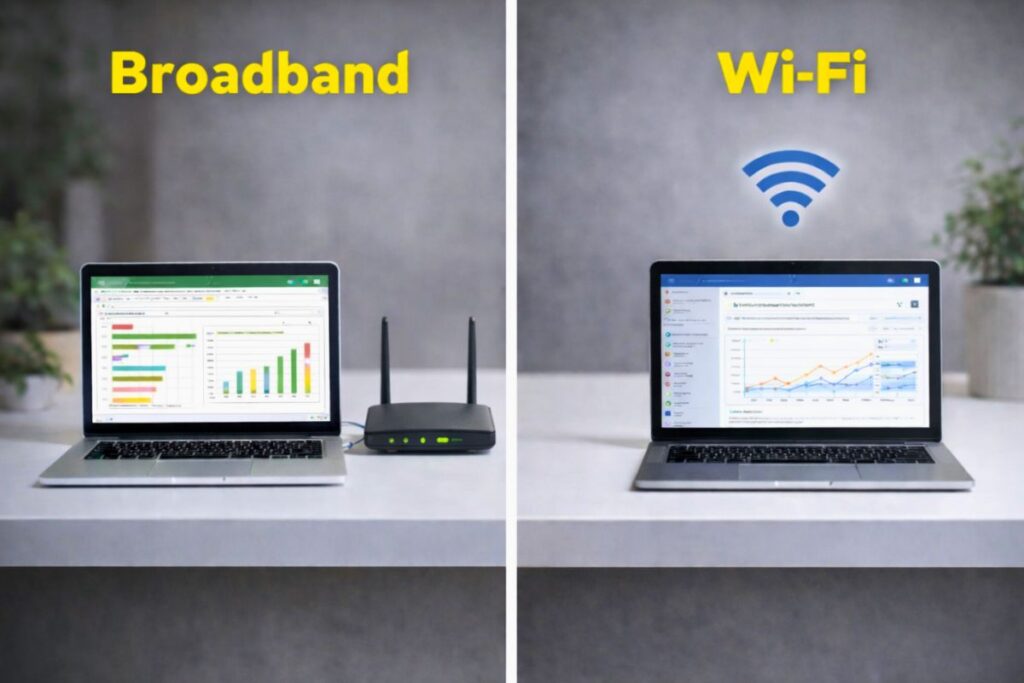
- Broadband is the pipe. It’s the physical connection—be it copper wire or fancy new fibre optic—that runs from the street, under your front garden, and through the wall. It’s the “big data” coming into the building. Companies like BT, Virgin Media, or Hyperoptic are your “water providers.”
- Wi-Fi is the tap. Once that data pipe hits your router, the router turns that physical connection into an invisible radio signal. This signal flies through the air so your phone or laptop can “catch” it.
The crazy part is that you can have a massive, high-pressure pipe (ultrafast broadband) but a tiny, rusted tap (an old Wi-Fi router), and you’ll still only get a trickle of data. Or, you could have the best tap in the world, but if the water company has cut off the mains, nothing is coming out.
The Comparison At A Glance (UK 2026 Standards)
| Feature | Broadband (The Connection) | Wi-Fi (The Signal) |
|---|---|---|
| What it actually is | Your subscription to the global internet. | The wireless way you link to your router. |
| How it gets to you | Physical cables (fibre/copper) or 5G masts. | Radio waves (2.4 GHz, 5 GHz, or 6 GHz). |
| Who provides it? | ISPs (Sky, TalkTalk, Zen, etc.). | Your router (the black box in the corner). |
| Common Problem | “Area outage” or a snapped cable. | “Dead zones” in the kitchen or interference. |
The Great British Copper Sunset
Now, why does this matter more right now? Because we’re in the middle of a massive shift. As of February 2026, the UK is sprinting toward the “Copper Switch-off.” Openreach and other providers are officially retiring the old analogue PSTN lines.
By January 2027, the goal is for the old copper-based broadband to be a thing of the past. If you’re still on an old ADSL line, your provider has probably already started pestering you to upgrade to “Full Fibre” (FTTP).
I spoke with a chap in Manchester last month who was furious because his “Wi-Fi” stopped working after an engineer visited. The truth? His Wi-Fi signal was 10/10, but the engineer had replaced his old copper broadband with a fibre line, and the new settings hadn’t kicked in yet. He had a great tap, but the new pipe wasn’t turned on.
But here’s the kicker most people aren’t ready for: the “Digital Voice” transition. Since we’re now in early 2026, the old analogue phone sockets are effectively fossils. If you’ve upgraded to Full Fibre, your home phone now plugs into the back of your router, not the wall.
This is a massive shift in how we see the difference between broadband and wifi. If your broadband pipe fails, your landline dies too.
I’ve had to explain to several elderly neighbours that their Wi-Fi router isn’t just for ‘the Facebook’; it’s now the lifeblood of their entire house, including their emergency calls. It raises the stakes. Suddenly, knowing why your connection dropped isn’t just about Netflix—it’s about staying connected to the world.
According to the latest Ofcom Connected Nations reports, about 88% of UK homes can now get gigabit-capable broadband.
Choosing Your Pipe: The Flavours Of Broadband
Not all broadband is created equal. Depending on where you live in the UK, your “pipe” might look very different:
- Full Fibre (FTTP): The gold standard. Pure fibre optic all the way to your door. In 2026, this is hitting speeds of 1Gbps to 2.2Gbps.
- Standard Fibre (FTTC): Fibre to the green cabinet on your street, then copper to your house. Reliable, but usually tops out around 80Mbps.
- 5G Home Broadband: No wires at all. A hub catches a mobile signal. It’s great for renters, with typical speeds between 150-300Mbps, though it can be a bit moody depending on the weather.
- Satellite (Starlink): For my friends in the Scottish Highlands or deep rural Wales where cables don’t reach. It’s fast, but the latency (the delay) can be a bit higher.
The Invisible Battle: 2.4GHz, 5GHz, And Wi-Fi 7
Once the broadband is in your house, the Wi-Fi takes over. Most modern UK routers are “dual-band.”
- 2.4GHz: This is the ‘slow and steady’ signal. It’s great at going through thick Victorian brick walls, but isn’t very fast. Look, I once spent three hours at a client’s house in Croydon trying to figure out why their ‘internet’ died every day at 1:00 PM. It wasn’t the broadband provider. It was their ancient microwave.
Every time they heated up a jacket potato, the leakage was so bad it literally nuked the 2.4GHz Wi-Fi signal. They thought they needed a new ISP; they actually just needed a new lunch routine. This is the “slow and steady” signal. It’s great at going through thick Victorian brick walls, but isn’t very fast.
- 5GHz: This is the “fast and flighty” signal. It’s brilliant for 4K streaming but dies the moment it sees a closed door.
- Wi-Fi 6 & 7: These are the new kids on the block. They handle dozens of devices at once without getting “congested”. If you’ve got a house full of smart bulbs, tablets, and consoles, you need a router that supports these.
ALSO READ: The “CPU Tax” of 1998: How the Audio Modem Riser Nearly Broke Our Early PCs
Why Your Router Might Be Lying To You
Here’s a scenario I’ve encountered a dozen times: A gamer complains about “lag.” They show me their phone, which has full Wi-Fi bars. “See?” they say. “The Wi-Fi is fine, but I have a stuttering game.”
The issue here is latency, and that’s where the broadband versus Wi-Fi dogfight gets truly heated. Wi-Fi is great, except when it’s subject to ”interference”. Each time your microwave oven switches on, or the house next door powers on its own router, those radio waves have to fight for space.
Pro Tip: If you want to see whether the issue is with your service or your house, grab an Ethernet cable. Connect your laptop directly to the back of the router. If the speed shoots up, your Wi-Fi is to blame. If the connection remains sluggish, there’s some explaining your broadband provider needs to do.
Now, I know what you’re thinking. You go to grab a cable and realise your shiny new MacBook or ultra-slim Dell doesn’t even have an Ethernet port. It’s one of those modern tech ironies—we have faster broadband than ever, but our gadgets have ditched the very port needed to test it. You’ll likely need to spend £15 on a USB-C to Ethernet ‘dongle.’
Honestly, I keep three of them in my kit bag because, in my experience, you can’t trust a wireless signal as far as you can throw the router. It’s an extra faff, but if you’re paying for 500Mbps and only seeing 40Mbps, that little plastic adapter is the only way to prove you’re being short-changed.
Keeping The Bad Guys Out
Broadband security usually happens at the provider level—they have firewalls to stop major attacks. Wi-Fi security, however, is your responsibility.
- WPA3: This is the latest security standard. If your router supports it, use it. It makes your password much harder to “brute-force.”
- Public Wi-Fi Risks: Never do your banking on a “Free Cafe Wi-Fi” network. Hackers can set up “Evil Twin” hotspots that look real but are just there to sniff your data. If you must use them, use a VPN.
So, How Do You Choose?
When you’re looking at those shiny leaflets from Virgin or Sky, they often scream about “Wall-to-Wall Wi-Fi Guarantees.” Don’t be fooled. No ISP can truly guarantee Wi-Fi speeds because they don’t know how thick your walls are.
Or your mirrors. I’m not joking—I’ve seen a massive, lead-backed Victorian mirror in a hallway act like a literal shield, bouncing the Wi-Fi signal right back at the router and leaving the rest of the house in a total blackout.
The broadband ‘pipe’ was delivering 500Mbps to the front door, but the ‘tap’ was being blocked by a piece of antique furniture. They’re guaranteeing the broadband speed to your front door.
If you live in a big house with “dead zones”, you don’t necessarily need a faster broadband plan. You need a Mesh Wi-Fi system.
This is a series of small “taps” placed around the house that talk to each other to ensure the signal reaches every corner.
ALSO READ: What Is A Good GPU Temperature? A Complete Beginner-Friendly Guide
The Final Reality Check
Next time your Netflix starts buffering, don’t just restart the router. Ask yourself: Is it the pipe or the tap?
- Is the “Internet” light on the router red? That’s a broadband problem.
- Are you in the attic and the signal is one bar? That’s a Wi-Fi problem.
Understanding what is difference between broadband and wifi isn’t just for tech geeks; it’s part of running a modern home. Check your hardware, know your connection, and for heaven’s sake, stop putting your router next to the fish tank. Water and radio waves? They don’t mix.
Frequently Asked Questions
Q1. If My Wi-Fi Is Full Bars, Why Is My Internet Still Slow?
Full bars only indicate that you have a strong connection to your router; however, your broadband “pipe” from the street may be challenged. It’s going to be like having a lovely new tap; only the water company’s turned the pressure down outside.
Q2. Can I Have Broadband Without Having Wi-Fi?
Yes! And it’s actually the fastest way to work. You simply plug an Ethernet cable straight from your router into your computer, bypassing the wireless signal completely and providing you with pure broadband speed.
Q3. Will Buying A New Router Make My Broadband Faster?
A better router can improve your Wi-Fi coverage in tricky rooms, but it will not change the speed that your provider sends to your house. If you are buying a 60Mbps “pipe”, there’s no way that a posh £300 router won’t magically turn it into 500Mbps.
Q4. Why Does My Internet Drop Out When I Use The Microwave?
Older Wi-Fi signals and microwave ovens often travel on the same 2.4GHz frequency, leading them to battle like two people shouting at once. Your router should be moved away from kitchen appliances if you want to quickly solve this annoying “broadband” mystery.
Q5. What Is The Best Way To Test My Actual Broadband Speed?
Before running a speed test, turn off your Wi-Fi and connect your laptop directly to the router with a cable. This tells you exactly what your “pipe” is delivering without any wireless interference messing up the results.
Sources And References
- Ofcom (The UK Telecoms Regulator): “Connected Nations 2025/2026 Reports.”
- UK Parliament Research: “The Withdrawal of Landlines and Switch to Digital Calls.”
- Openreach (BT Group): “Upgrading the UK to Digital Phone Lines.”
- Hyperoptic Technology Guide: “Broadband vs Wi-Fi: What’s the Difference?”
- Uswitch Consumer Guide: “Why is my internet so slow? Troubleshooting Guide”
- Virgin Media O2: “What is Full Fibre (FTTP)?”
Disclaimer: This article is provided for general informational and educational purposes only. It is not intended as advertising, endorsement, or promotion of any internet service provider, router brand, or product mentioned. Any company names, services, or examples referenced are included solely for clarity and comparison. Readers should verify availability, pricing, and technical details directly with their chosen provider before making any purchasing or service decisions.